
The Eisenhower Matrix: A Practical Guide to Urgent vs. Important Tasks (with Notion and PDF Templates)
Just because you were “busy” all week doesn’t mean you completed anything that actually moved your broader business objectives forward.
The Eisenhower Matrix is one way I sort that out. I use it to manage and focus on product updates, so the examples here come from product work. My favorite thing about it is it clears the playing field so that everything isn’t “urgent.” It lets you move forward with what actually moves the needle and avoid getting stuck ticking off boxes that don’t matter.
Want the template first? I put together a free Eisenhower Matrix PDF (an explanation plus a blank template). If you organize in Notion, Alex Sherwood’s free Eisenhower Matrix template is on Notion’s marketplace.
What is the Eisenhower Matrix?
It’s a task management tool that helps you prioritize based on urgency and importance. Every task goes in one of four boxes. It’s also called the time matrix, or the urgent vs. important matrix.
The name comes from Dwight D. Eisenhower, the 34th President of the United States, and the line usually credited to him: “What is important is seldom urgent, and what is urgent is seldom important.”
Urgent vs. important
Urgent is the invoice due Friday or the customer who can’t log in today. Let either one sit for a week and it costs you.
Important is anything that moves your goals forward, and it usually has no due date. I once tweeted this as the day’s mantra: “Ship the thing instead of obsessing over details that don’t move the needle.”
My 30-minute weekly review has a question that catches the difference: did you prioritize things that benefit you or your clients, or did you prioritize stuff you knew would be easy to check off?
The four quadrants, with product examples
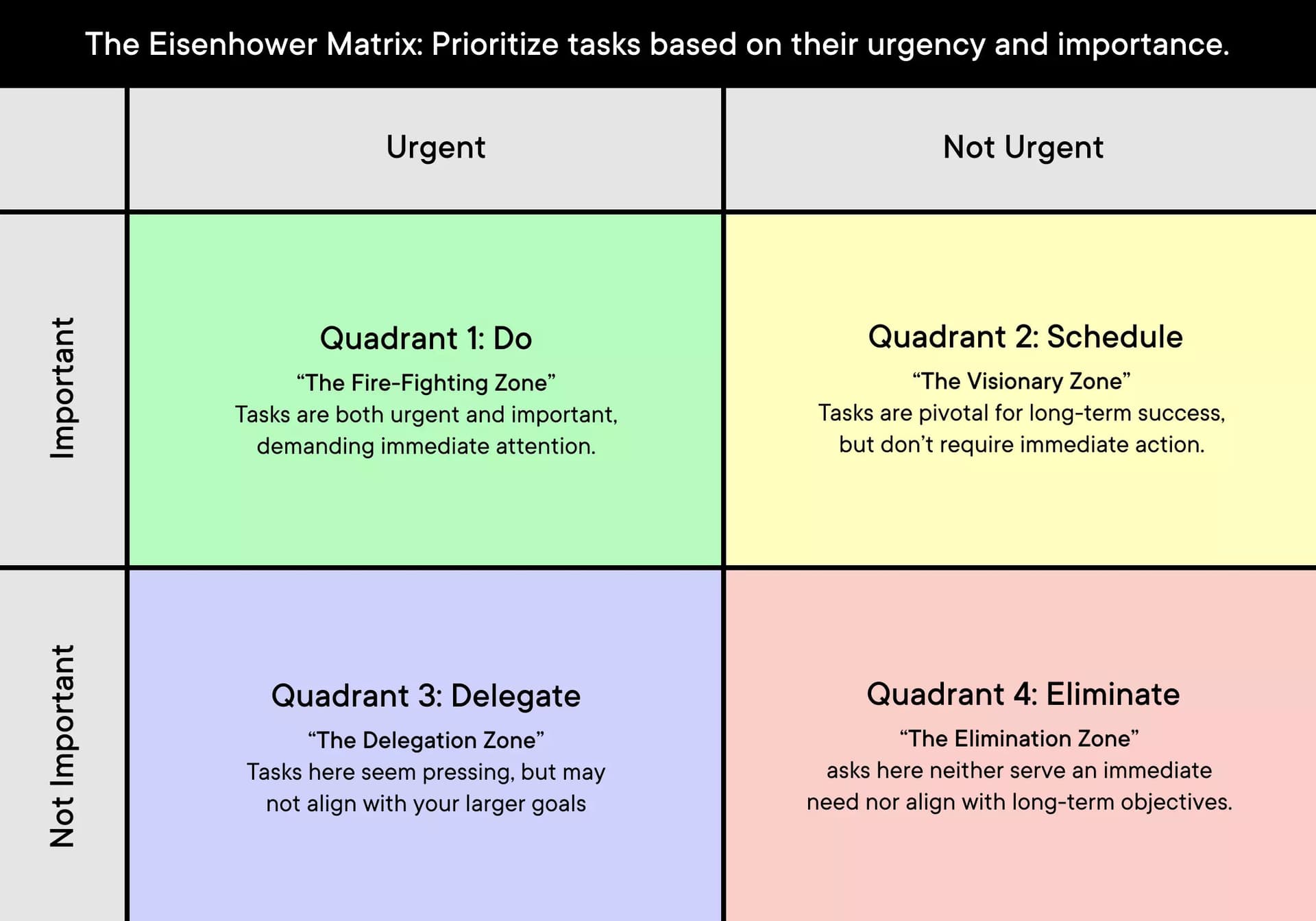
Each example below is a hypothetical for someone selling a digital product.
Quadrant 1: Urgent and important (do it now)
Say a customer emails that checkout is broken. Nobody can buy until it’s fixed, so every hour costs sales.
Quadrant 2: Important, not urgent (schedule it)
Say customers keep asking for the same feature. It would make the product better, and nothing breaks if it waits a week.
If you take good care of your customers, you should have a ton of new features driven by their feedback waiting in the wings. These are the tasks that need time on the calendar.
Quadrant 3: Urgent, not important (delegate or automate it)
Urgent to someone else doesn’t make it important to your goals, and that’s what makes it safe to hand off. Say a customer wants a same-day answer to a setup question your FAQ already covers. Point them to the knowledge base or let someone else on support answer.
Quadrant 4: Not urgent, not important (drop it)
Say you spend an afternoon adjusting padding on a page nobody asked you to change.
Trying to “make things perfect” is usually procrastination disguised as productivity.
If a lot of your busy days land here, read about the productive procrastination trap.
How to use the Eisenhower Matrix each week
- Pick the goal for the week. Before you can put any time into a weekly review, you need to know what to focus on.
- Sort the week’s tasks. Does it move that goal, and what happens if it waits?
- Block Quadrant 2 time on the calendar.
- Move tasks when a deadline moves. If that feature request gets tied to a launch next Friday, it goes to Quadrant 1.
A few years ago I stumbled upon a technique called time blocking. Without question, it changed the way I work and quickly became the foundation of my daily structure.
For the blocks themselves, the Pomodoro Technique works in 25-minute bursts.
Eisenhower Matrix PDF download and Notion template
If you like writing things out, the free Eisenhower Matrix PDF has both an explanation and a blank template.
If you live in Notion, I found Alex Sherwood’s free Eisenhower Matrix template on Notion’s marketplace.
My own setup is a mix of Notion and Reminders. Notion when I need deeper, more organized work. Reminders when I need to jot down ideas and tasks (I use it as a to-do list). Reminders might be a little simplistic, but the constraints help me focus on organization and checking off tasks.
Everything isn’t urgent
Do Quadrant 1 now. Put Quadrant 2 on the calendar before the week fills up. Delegate or automate Quadrant 3. Drop Quadrant 4.
Learning to say no is just as important as saying yes.
FAQ
What is the Eisenhower matrix?
A task management tool that sorts tasks by urgency and importance into four quadrants: do it now, schedule it, delegate it, drop it. It’s also called the time matrix or the urgent vs. important matrix.
What is urgent vs important?
Urgent needs attention now. Important moves your goals forward.
What are urgent but not important examples?
A same-day answer to a question your FAQ already covers, or anything else someone needs from you soon that a knowledge base or a teammate could handle.
How do I use an Eisenhower matrix template?
At the start of each week, drop your tasks into the four quadrants, then adjust as things change. Use the free Eisenhower Matrix PDF if you prefer paper, or the Notion template if you work digitally.
What are Eisenhower matrix examples?
A broken checkout is urgent and important. A feature customers keep asking for is important but can wait, so it gets scheduled.
Matt Downey is a designer who has spent over two decades building digital businesses, now Head of Design at Atlas UP. He writes Digital Native, the newsletter for designers building in the AI era.